Let me be honest with you.
When I first heard about ChatGPT and other AI tools, I was excited — until I saw the monthly subscription bill. $20 a month. Then they started limiting how many questions you can ask. Then they changed the pricing again.
And the worst part? Every question you ask, every document you paste in — it all goes to someone else’s server. Your business ideas, your private messages, your personal files.
Then I discovered Ollama.
I downloaded it on a Tuesday afternoon, ran my first AI model 20 minutes later, asked it 1,000 questions that day, and paid exactly zero dollars for all of it.
That’s what this guide is about. I’m going to explain what Ollama is, how it works, why it’s completely free, and how you can start using it today — even if you’ve never touched AI tools before.
What is Ollama? (Simple Definition)
Ollama is a free, open-source tool that lets you download and run powerful AI models directly on your own computer — no internet required, no subscriptions, no monthly fees.
Think of it like this:
You know how Netflix streams movies from their servers to your TV? ChatGPT works the same way — your questions are sent to OpenAI’s massive data centers, they process them, and send the answer back to you.
Ollama is different. It’s like downloading a movie to watch offline. The AI model lives entirely on your computer. When you ask a question, everything happens locally — on your CPU and GPU — without sending a single byte of data to any external server.
In plain English: Ollama = Free AI that runs 100% on your own computer.
How Does Ollama Work?
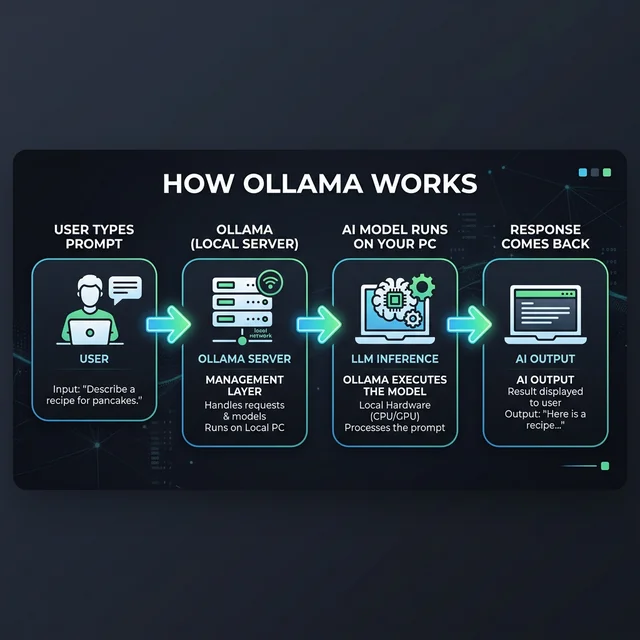
Here’s the surprisingly simple process of how Ollama works under the hood:
Step 1 — You Install Ollama
Ollama is a lightweight server application that runs silently in the background on your computer. It’s available for Windows, Mac, and Linux. Installation takes about 2 minutes.
Step 2 — You Download an AI Model
Think of AI models like “brains” of different sizes and specialties. You choose one — say, Meta’s Llama 3 or DeepSeek — and Ollama downloads it directly to your computer. These are the same models that power enterprise AI applications, just packaged in a way your laptop can handle.
bash# One command to download and run a modelollama run llama3
That’s it. Ollama downloads the model (usually 4–40 GB depending on the model), and within minutes you’re chatting with a locally running AI.
Step 3 — You Talk to It
Once running, Ollama creates a local server on your computer at http://localhost:11434. You can:
- Chat with it directly in your terminal
- Connect it to a beautiful web interface like Open WebUI
- Use it from your own Python or JavaScript code
Step 4 — Everything Stays on Your Machine
Your prompts, your data, the model responses — nothing ever leaves your computer. There are no API calls to external services (unless you choose to connect to them). Just you, your hardware, and the AI.
Cloud AI vs Local AI — What’s the Difference?
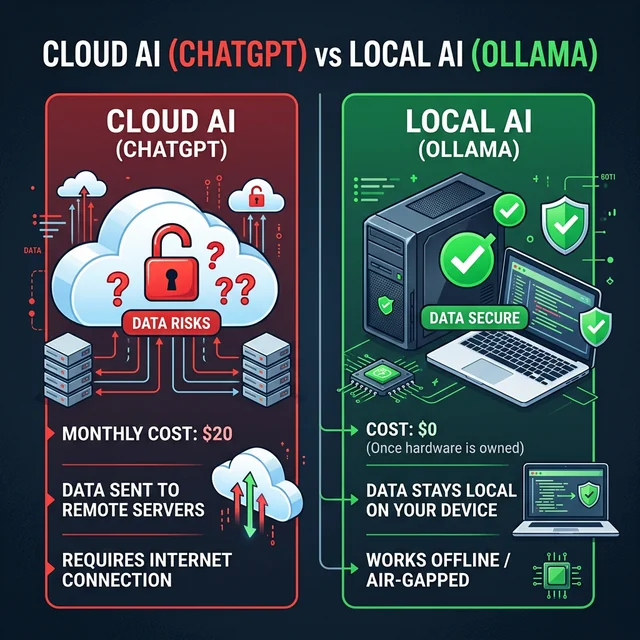
This is the question I get asked the most, so let me break it down clearly:
| Feature | Cloud AI (ChatGPT, Gemini) | Local AI (Ollama) |
|---|---|---|
| Cost | $0–$200/month | 💚 $0 forever |
| Privacy | Your data goes to their servers | 💚 Data never leaves your PC |
| Internet required | Yes, always | 💚 No, works fully offline |
| Speed | Depends on their servers | Depends on your hardware |
| Model quality | GPT-4 is very powerful | Good to excellent (model-dependent) |
| Customization | Very limited | 💚 Complete control |
| Usage limits | Yes — rate limits apply | 💚 Unlimited questions |
| Setup difficulty | Instant | 5–15 minutes |
The bottom line: If privacy, cost, or offline use matters to you — Ollama wins. If you need cutting-edge performance for complex tasks right now, cloud AI still has an edge in raw capability (though that gap is closing fast in 2026).
Why Use Ollama? 7 Real Reasons
I’ve been using Ollama for over a year now, and here are the actual reasons it has become my primary AI tool:
1. It’s Completely Free — Forever
Not “freemium.” Not “free with 10 questions a day.” Actually, completely free. The Ollama software itself is open-source. The AI models (Llama 3, Mistral, DeepSeek, etc.) are also free and open-source. The only thing Ollama costs you is electricity.
For comparison: ChatGPT Plus = $240/year. Claude Pro = $240/year. Ollama = $0.
2. Your Data Never Leaves Your Computer
This one is huge, especially if you’re using AI for:
- Legal documents
- Medical data
- Business strategy & confidential ideas
- Personal journaling or private conversations
- Code from work (many companies ban uploading code to ChatGPT)
With Ollama, you could paste your entire company’s codebase and absolutely nothing goes outside your computer.
3. Works Completely Offline
No internet? No problem. I use Ollama on flights, in areas with bad wifi, and even on an air-gapped computer that has no network connection at all.
Real example: I was writing on a train with no signal for 4 hours. Ollama kept helping me write, edit, and brainstorm — without a single hiccup.
4. No Usage Limits, Ever
ChatGPT cuts you off after a certain number of messages. Gemini has daily limits. With Ollama, you can ask 10,000 questions in a day and it won’t complain once. I’ve literally left it running all night generating content — completely unrestricted.
5. Customize Your AI’s Personality
With a feature called Modelfile, you can create custom versions of any AI model. Want an AI that always responds in a formal legal tone? Done. Want an AI that codes only in Python and explains everything like you’re a beginner? Also done. This level of customization is impossible with cloud AI tools.
6. Runs Multiple Models
Unlike ChatGPT (which only gives you GPT), Ollama lets you run dozens of different AI models. Need a model that’s great at coding? Use CodeLlama. Need one that’s great at reasoning? Use DeepSeek-R1. Need a tiny model that runs on a weak laptop? Use Phi-3. You pick the right tool for the job.
7. Thriving Open-Source Community
Ollama has one of the most active open-source AI communities right now. There are hundreds of integrations, plugins, and tools being built around it every week. If you want to build something with local AI, Ollama is the platform the developer community is choosing.
What AI Models Can You Run with Ollama?
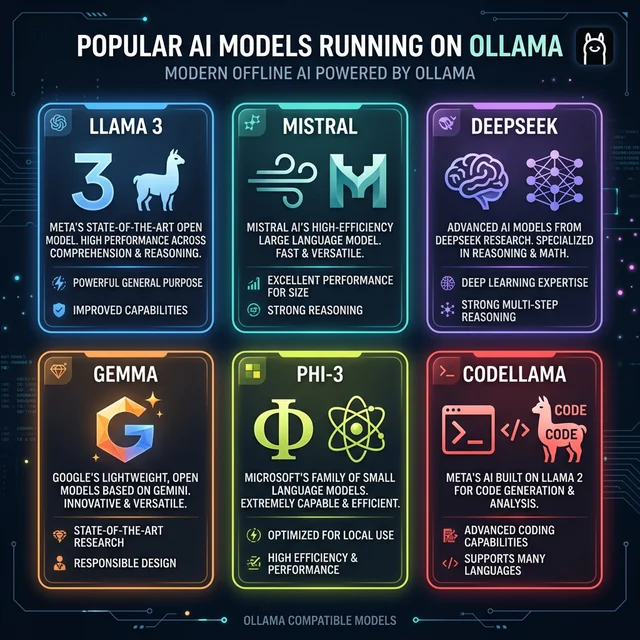
This is where things get exciting. Ollama doesn’t just run one AI — it supports hundreds of models. Here are the most popular ones as of March 2026:
🦙 Llama 3.1 / Llama 4 (by Meta)
Best for: General use, writing, analysis, conversation The most popular open-source model family. Available in 8B and 70B sizes. Llama 4 (released April 2025) is even better with multimodal capabilities.
bashollama run llama3.1
🔍 DeepSeek-R1 (by DeepSeek AI)
Best for: Math, reasoning, research, complex problem-solving Currently the #1 trending model on Ollama. DeepSeek-R1 matches GPT-4 level reasoning on many benchmarks — and it’s completely free to run locally.
bashollama run deepseek-r1
💨 Mistral 7B (by Mistral AI)
Best for: Fast responses, everyday tasks, running on lower-end hardware Great performance in a compact package. Very fast even without a GPU.
bashollama run mistral
💎 Gemma 3 (by Google)
Best for: Balanced tasks, runs well on laptops Google’s open-source model. The 27B version rivals Gemini 1.5 Pro on many benchmarks.
bashollama run gemma3
🔵 Phi-3 (by Microsoft)
Best for: Old computers, low RAM systems One of the best “small but smart” models. Can run on a computer with just 8GB RAM.
bashollama run phi3
💻 CodeLlama / Qwen2.5-Coder
Best for: Programming, code review, debugging Purpose-built for writing and explaining code. Supports dozens of programming languages.
bashollama run codellama
Pro tip: Not sure which model to start with? Start with
llama3.1for general tasks ordeepseek-r1if you want to be impressed by its reasoning ability.
What Computer Do You Need to Run Ollama?
One of the most common questions I get is: “Will this run on my computer?”
Good news — Ollama works on a fairly wide range of hardware. Here’s a practical breakdown:
Minimum Requirements (Works, but slower)
- RAM: 8 GB
- Storage: 10+ GB free space
- CPU: Any modern CPU (Intel i5/i7, AMD Ryzen 5/7, Apple M1)
- GPU: Not required (will use CPU only)
- OS: Windows 10/11, macOS 11+, or Linux
At this level, you can run small models like Phi-3 (3.8B) or Gemma 2B. Responses may take 10–30 seconds.
Recommended (Smooth experience)
- RAM: 16 GB+
- Storage: 50+ GB free space
- GPU: NVIDIA with 6+ GB VRAM (or Apple Silicon M1/M2/M3)
- OS: Any modern OS
At this level, you can run Llama 3.1 8B comfortably. Responses come in 2–5 seconds.
Power User (Everything runs great)
- RAM: 32 GB+
- GPU: NVIDIA with 16–24 GB VRAM
- Storage: 200+ GB SSD
At this level, you can run 70B parameter models — basically comparable to GPT-4.
Is Ollama Really Free?
Yes, 100%. Let me address this clearly because I know it sounds too good to be true.
Ollama the software: Open-source and free. Licensed under MIT.
The AI models (Llama, Mistral, Gemma, DeepSeek): All open-source and free. Released by Meta, Google, Mistral AI, and DeepSeek respectively.
The only “costs” involved:
- Your electricity (running AI uses power — roughly equivalent to playing a video game)
- Your storage space (models range from 2 GB to 40 GB)
- Your hardware (you already own this)
One exception to know about: Ollama recently launched “Ollama Turbo” — an optional paid cloud service for running very large models that don’t fit on consumer hardware. This is 100% optional. Local Ollama is completely free and will remain so.
Who is Ollama For?
Based on my experience and the Ollama community, here’s who gets the most value from it:
✅ You should use Ollama if you are a:
- Developer who wants to integrate AI into apps without API costs
- Content creator who needs unlimited AI writing assistance
- Researcher or student working with sensitive data
- Privacy-conscious person who doesn’t trust cloud AI with their data
- Business owner who wants to cut AI subscription costs
- Programmer who wants a free local code assistant (like a free Copilot)
- AI enthusiast who wants to experiment with different models
❌ Ollama might not be for you if:
- You need GPT-4 level quality for very complex reasoning (though DeepSeek-R1 is catching up fast)
- You don’t have at least 8 GB of RAM on your computer
- You want something that works with zero setup (ChatGPT is easier to start)
- You primarily work on a phone or tablet (Ollama needs a desktop/laptop)
Ollama vs ChatGPT — Quick Comparison
I know many of you are deciding between these two. Here’s my honest take:
| ChatGPT (GPT-4o) | Ollama (DeepSeek-R1) | |
|---|---|---|
| Cost | $20/month | Free |
| Privacy | OpenAI stores your chats | Your data never leaves your PC |
| Quality | ⭐⭐⭐⭐⭐ | ⭐⭐⭐⭐ (and improving monthly) |
| Offline use | ❌ | ✅ |
| Usage limits | Yes | No limits |
| Image generation | Yes (DALL-E) | Not built-in |
| Voice chat | Yes | With plugins |
| Plugins/integrations | Many | Growing rapidly |
| Best for | Power users, complex tasks | Privacy, free use, developers |
My honest recommendation: Use both. Use Ollama for 80% of your daily tasks (it handles most things great). Use ChatGPT or Claude for the 20% of tasks that need top-tier reasoning or image generation.
How to Get Started with Ollama — Your First Steps
Getting started is genuinely easy. Here’s the fastest path from zero to running AI locally:
Step 1: Download Ollama
Go to ollama.com and download the installer for your operating system (Windows, Mac, or Linux).
Step 2: Install It
Run the installer — it’s a standard installation wizard. Should take under 2 minutes.
Step 3: Open Your Terminal
- Windows: Search for “PowerShell” or “Command Prompt” and open it
- Mac: Open “Terminal” (find it in Applications → Utilities)
- Linux: You already know this 🙂
Step 4: Run Your First Model
Type this command and press Enter:
bashollama run llama3.1
Ollama will download the model (about 5 GB — grab a coffee) and then start a chat session directly in your terminal.
Step 5: Ask It Anything
>>> Write me a blog post introduction about solar energy
That’s it. You’re now running AI locally. 🎉
What Next?
Once you’re comfortable with the basics, explore:
- How to Install Ollama on Windows → (detailed step-by-step with screenshots)
- Best Models to Run with Ollama → (which model for which task)
- How to Add a Web Interface to Ollama → (stop using the terminal, use a beautiful chat UI)
- Ollama Python Tutorial → (for developers who want to build apps)
Frequently Asked Questions About Ollama
Is Ollama safe to use?
Yes. Ollama is open-source software — you can inspect every line of its code on GitHub. Since it runs locally, there is no data being sent to third parties. It’s actually safer than cloud AI tools.
Can Ollama run on a laptop?
Yes, absolutely. You don’t need a powerful desktop. Many users run Ollama successfully on laptops — especially MacBooks with Apple Silicon (M1/M2/M3 chips are very efficient for local AI). On Intel/AMD laptops, stick to smaller models like Phi-3 or Gemma 2B.
Is Ollama the same as ChatGPT?
No. ChatGPT is a product by OpenAI that runs their GPT models on cloud servers. Ollama is an open-source tool for running different AI models (Llama, Mistral, DeepSeek, etc.) on your own computer. The concept is similar (chat with AI), but the technology, cost, and privacy are very different.
How much RAM do I need for Ollama?
The minimum is 8 GB of RAM. With 8 GB, you can run models up to about 7 billion parameters (like Mistral 7B). For better performance, 16 GB or more is recommended.
Do I need a GPU to use Ollama?
No. Ollama works on CPU-only systems. However, a GPU (especially NVIDIA with 6+ GB VRAM) makes it significantly faster. Apple Silicon Macs handle local AI very efficiently due to their unified memory architecture.
Can Ollama generate images?
Not by itself — Ollama is a language model runner (text in, text out). For image generation, you’d need a separate tool like ComfyUI or Stable Diffusion. However, the newer multimodal models on Ollama (like Llama 4) can understand and describe images you show it.
Is Ollama legal?
Yes. Ollama is legal to use, and the open-source models it runs are released under open-source licenses (like Meta’s Llama license, MIT, etc.). Always check the specific license of the model you download if you plan to use it commercially.
How is Ollama different from Hugging Face?
Hugging Face is a platform for sharing AI models (like GitHub for AI). Ollama is a tool for running those models locally. They actually complement each other — many Hugging Face models are available for Ollama.
Can I use Ollama for my business?
Yes. Many businesses use Ollama for internal tools, customer support bots, document processing, and code assistance. Running AI locally with Ollama can save thousands in monthly API costs. Check the license of the specific model you use for commercial terms.
Will Ollama always be free?
The core Ollama software is open-source (MIT license) and will remain free. The recently launched “Ollama Turbo” is an optional paid cloud service, but local Ollama functionality has no plans to become paid.
Final Thoughts
Here’s my honest bottom line after a year of using Ollama daily:
Ollama has genuinely changed how I work with AI.
Not because it’s perfect — cloud AI like ChatGPT still has an edge in raw capability. But the combination of zero cost, complete privacy, and no usage limits makes it the best tool for 80% of everyday AI tasks.
If you’re tired of paying monthly fees, worried about your data privacy, or just want to experiment with AI without restrictions — Ollama is the best place to start.
It takes 10 minutes to set up. It costs nothing. And once you run your first local AI model, you’ll wonder why you waited so long.
Have questions about Ollama? Drop them in the comments below and I’ll help you out personally.
About the Author
This guide was written by a tech writer and AI enthusiast who has been running local LLMs since 2023. All experiences mentioned are based on real personal usage of Ollama across Windows, Mac, and Linux systems.