With over 200 models available on Ollama’s model library and new ones added every week, choosing what to actually run can feel overwhelming. I’ve personally tested dozens of these models across different hardware setups — from an 8 GB MacBook Air to a workstation with an RTX 4090 — and I can tell you: most people are running the wrong model for their needs.
This guide breaks down the best Ollama models in 2026 by use case, hardware requirements, and real-world performance — so you spend less time downloading and more time actually using AI.
How to Choose the Right Ollama Model
Before jumping into the list, the single most important factor is: how much RAM (or VRAM) do you have? A model that runs beautifully on a 32 GB machine will completely freeze a 8 GB system.
| Your Hardware | Model Size to Target | Best Models |
|---|---|---|
| 8 GB RAM (CPU only) | 1B–3B params, Q4 quant | Phi-3 Mini, Gemma 2B, TinyLlama |
| 16 GB RAM (CPU only) | 7B–8B params, Q4 quant | Llama 3.1 8B, Mistral 7B, Gemma 7B |
| 6–8 GB VRAM (GPU) | 7B–8B params, full precision | Mistral 7B, Llama 3.1 8B, Phi-3 Medium |
| 12–16 GB VRAM (GPU) | 13B–27B params | Gemma 27B, Llama 3.1 8B (fast), CodeLlama 13B |
| 24+ GB VRAM (GPU) | 32B–70B params | DeepSeek-R1 32B, Llama 3.1 70B, Qwen2.5 72B |
Rule of thumb: a 7B model at 4-bit quantization (Q4) needs roughly 4–5 GB of RAM. A 13B model needs 8–9 GB. Always leave 2–3 GB of RAM free for your operating system.
The Best Ollama Models in 2026 — Complete List
1. Llama 3.1 — Best Overall Model
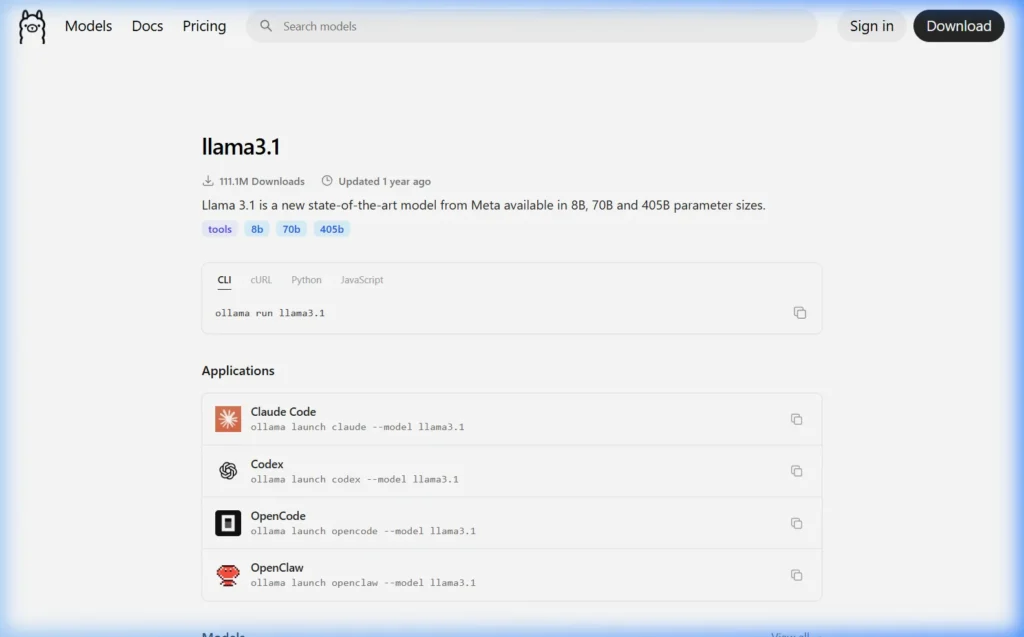
ollama run llama3.1| Property | Details |
|---|---|
| Developer | Meta AI |
| Sizes Available | 8B, 70B, 405B |
| Default Download | 4.7 GB (8B, Q4 quantized) |
| Minimum RAM | 8 GB (for 8B version) |
| Best For | General chat, writing, coding, analysis |
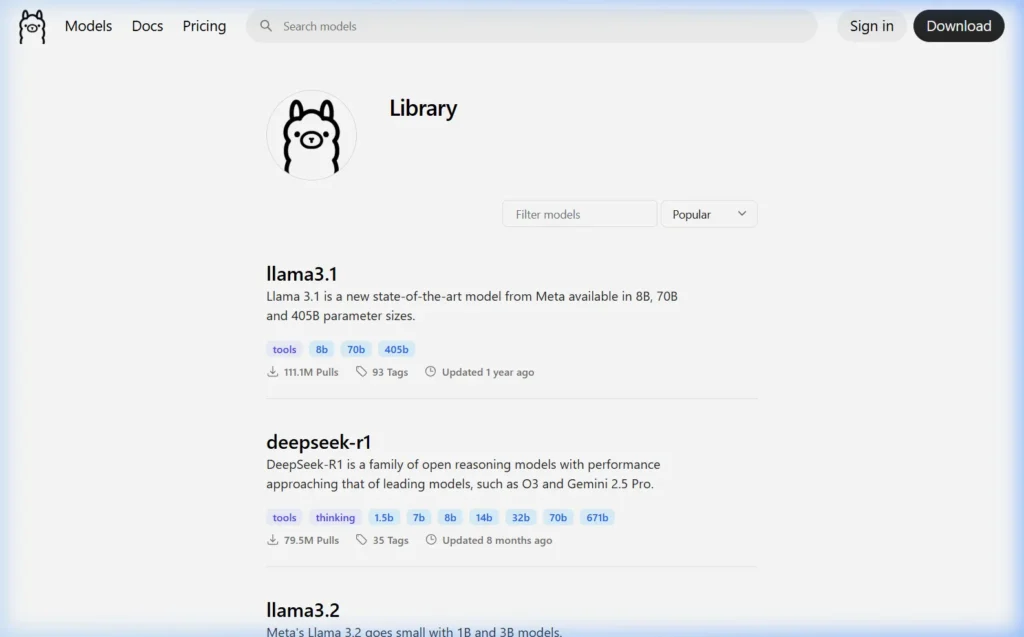
| Ollama Downloads | 111+ million |
Llama 3.1 is the most downloaded model on Ollama for good reason — it’s the most well-rounded open model available. The 8B version runs on virtually any modern PC with 8 GB RAM, and the quality is genuinely impressive for general conversation, writing tasks, summarization, and light coding.
Meta trained Llama 3.1 on over 15 trillion tokens with a 128k token context window, which means it can handle very long documents. I use it daily for drafting emails, analyzing articles, and generating content outlines. It’s the model I’d recommend to any Ollama beginner.
Pro tip: Run
ollama run llama3.1:70bif you have 32+ GB RAM — the performance jump from 8B to 70B is substantial for complex reasoning tasks.
2. DeepSeek-R1 — Best for Reasoning & Analysis
ollama run deepseek-r1| Property | Details |
|---|---|
| Developer | DeepSeek AI |
| Sizes Available | 1.5B, 7B, 8B, 14B, 32B, 70B, 671B |
| Default Download | 4.7 GB (7B, Q4 quantized) |
| Minimum RAM | 8 GB (for 7B version) |
| Best For | Math, logic, coding, step-by-step reasoning |
| Ollama Downloads | 79+ million |
DeepSeek-R1 caused a sensation when it launched in early 2025. It’s a “thinking” model — meaning it reasons through problems step by step before giving an answer, similar to OpenAI’s o1 model. The results for math problems, logic puzzles, and technical reasoning are genuinely better than Llama 3.1 at equivalent sizes.
The tradeoff: because it “thinks” before answering, responses take longer. For a simple factual question, Llama 3.1 is faster. For anything requiring careful reasoning — “debug this code,” “solve this math problem,” “explain the flaw in this argument” — DeepSeek-R1 is the better choice.
The 32B version on a GPU-equipped machine is the one that genuinely rivals GPT-4 for technical tasks. If you have 24+ GB VRAM, it’s worth trying.
3. Mistral 7B — Best for Speed on Modest Hardware
ollama run mistral| Property | Details |
|---|---|
| Developer | Mistral AI (France) |
| Sizes Available | 7B (multiple variants) |
| Default Download | 4.1 GB (Q4 quantized) |
| Minimum RAM | 8 GB |
| Best For | Fast responses, summarization, instruction following |
Mistral 7B was the model that first made people realize small open-source models could be genuinely useful. Despite being “only” 7 billion parameters, it punches well above its weight class — especially for tasks like summarizing text, following structured instructions, and generating clean prose.
Where Mistral excels is inference speed. On a decent GPU it generates tokens noticeably faster than similarly-sized Llama models, which makes it excellent for use cases where you’re generating a lot of text quickly — like batch summarization or running as a backend for an application.
4. Phi-3 Mini — Best for 8 GB RAM Systems
ollama run phi3:mini| Property | Details |
|---|---|
| Developer | Microsoft Research |
| Sizes Available | 3.8B Mini, 14B Medium |
| Default Download | 2.3 GB (Mini, Q4 quantized) |
| Minimum RAM | 4 GB (Mini) / 8 GB (Medium) |
| Best For | Low-end hardware, fast responses, coding help |
Microsoft trained Phi-3 Mini on high-quality “textbook-style” data specifically to maximize intelligence per parameter. The result is a 3.8B model that consistently outperforms many 7B models on benchmarks — particularly for coding tasks and structured reasoning.
At 2.3 GB, Phi-3 Mini is the model I recommend for anyone with a modest laptop or PC. It runs comfortably with 8 GB of RAM, responds quickly even on CPU, and covers 90% of everyday use cases well. It’s also ideal for Raspberry Pi 4/5 owners running Ollama on ARM hardware.
5. Gemma 3 — Best Google Model
ollama run gemma3| Property | Details |
|---|---|
| Developer | Google DeepMind |
| Sizes Available | 1B, 4B, 12B, 27B |
| Default Download | 3.3 GB (4B, Q4 quantized) |
| Minimum RAM | 6 GB (4B version) |
| Best For | Multimodal tasks, creative writing, long context |
Gemma 3 is Google DeepMind’s latest open-source model family, and it’s a significant step up from Gemma 2. The 27B version — if your hardware can handle it — produces output quality that rivals much larger models from previous generations.
What makes Gemma 3 stand out is its multimodal support — the 4B and larger versions can analyze images as well as text. Combined with Ollama’s model serving, this means you can build a local AI assistant that reads documents, describes images, and answers questions about both.
6. CodeLlama — Best for Programming
ollama run codellama| Property | Details |
|---|---|
| Developer | Meta AI |
| Sizes Available | 7B, 13B, 34B, 70B |
| Default Download | 3.8 GB (7B, Q4 quantized) |
| Minimum RAM | 8 GB |
| Best For | Code generation, debugging, code explanation |
| Languages | Python, JS, TypeScript, C++, Java, SQL, and more |
CodeLlama is a Llama model fine-tuned specifically on code. If you spend a lot of time writing code, this is the model to use. It handles code completion, bug fixing, code explanation, and converting code between languages better than general-purpose models at the same size.
The CodeLlama 34B Instruct version (requires 20+ GB RAM) is the flagship — it’s noticeably better at completing complex multi-file tasks than the 7B version. However, the 7B version is a solid free local replacement for GitHub Copilot for most everyday coding work.
7. Qwen2.5 — Best Multi-Language Model
ollama run qwen2.5| Property | Details |
|---|---|
| Developer | Alibaba Cloud (China) |
| Sizes Available | 0.5B, 1.5B, 3B, 7B, 14B, 32B, 72B |
| Default Download | 4.7 GB (7B, Q4 quantized) |
| Minimum RAM | 8 GB (7B version) |
| Best For | Non-English languages, coding, math |
| Languages | 29 languages including Chinese, Arabic, Hindi |
Qwen2.5 is the best choice if you need to work in a language other than English. Developed by Alibaba, it has exceptionally strong multilingual capabilities across 29 languages — particularly Chinese, Arabic, Hindi, French, German, Spanish, and Japanese.
The Qwen2.5 72B model consistently ranks among the top open-source models on coding benchmarks (HumanEval, MBPP), making it a strong competitor to GPT-4o for programming tasks — if you have the hardware to run it.
8. LLaVA — Best for Image Understanding
ollama run llava| Property | Details |
|---|---|
| Developer | Microsoft / Haotian Liu et al. |
| Sizes Available | 7B, 13B, 34B |
| Default Download | 4.7 GB (7B, Q4 quantized) |
| Minimum RAM | 8 GB |
| Best For | Image description, visual Q&A, screenshot analysis |
LLaVA (Large Language and Vision Assistant) is the original multimodal model in Ollama’s library. You can give it an image and ask questions about it — making it useful for describing product photos, analyzing charts, extracting text from screenshots, or describing diagrams.
# Pass an image to LLaVA from the command line
ollama run llava "Describe what you see in this image" --image /path/to/image.jpg
9. Nomic Embed Text — Best for Embeddings & RAG
ollama pull nomic-embed-text| Property | Details |
|---|---|
| Developer | Nomic AI |
| Download Size | 274 MB |
| Minimum RAM | 2 GB |
| Best For | Semantic search, RAG pipelines, document similarity |
Nomic Embed Text is not a chat model — it’s an embedding model. You use it to convert text into numerical vectors for semantic search, document retrieval, and building RAG (Retrieval-Augmented Generation) systems where the AI answers questions based on your own documents.
At 274 MB it’s tiny, and it produces embeddings that are consistently better than OpenAI’s ada-002 on many benchmarks. If you’re building any kind of AI application that searches through documents, Nomic is essential.
10. Llama 3.2 Vision — Best Current Multimodal Model
ollama run llama3.2-vision| Property | Details |
|---|---|
| Developer | Meta AI |
| Sizes Available | 11B, 90B |
| Default Download | 7.9 GB (11B, Q4 quantized) |
| Minimum RAM | 16 GB |
| Best For | Image + text tasks: OCR, chart reading, visual reasoning |
Llama 3.2 Vision is the best multimodal model currently available in Ollama. It’s significantly better than LLaVA at understanding visual content — it can read text in images (OCR), interpret charts and graphs, describe UI screenshots accurately, and handle complex visual reasoning tasks.
If you want to build a local AI that can truly understand images, this is the model to use. The 11B version runs on systems with 16 GB RAM; the 90B version requires 64+ GB of memory.
Best Model By Use Case — Quick Reference
| Use Case | Best Model | Command |
|---|---|---|
| General chat & writing | Llama 3.1 8B | ollama run llama3.1 |
| Coding & debugging | CodeLlama 13B or Qwen2.5-Coder | ollama run codellama:13b |
| Math & reasoning | DeepSeek-R1 | ollama run deepseek-r1 |
| Image understanding | Llama 3.2 Vision | ollama run llama3.2-vision |
| Low-RAM machines (8GB) | Phi-3 Mini | ollama run phi3:mini |
| Non-English languages | Qwen2.5 7B | ollama run qwen2.5 |
| Fastest responses | Mistral 7B | ollama run mistral |
| Privacy-sensitive tasks | Any — all run offline | Your choice |
| Document search & RAG | Nomic Embed Text | ollama pull nomic-embed-text |
| High-quality long tasks | Llama 3.1 70B | ollama run llama3.1:70b |
Understanding Model Quantization — What Q4, Q8 Mean
When you look at model names in Ollama, you’ll see tags like :7b-q4_0, :8b-instruct-q8_0, or :7b-q2_k. Here’s what these mean:

| Quantization | Quality | RAM Usage | Best For |
|---|---|---|---|
| FP16 (full) | Best quality | ~14 GB for 7B | High-end GPUs |
| Q8_0 | Excellent (near FP16) | ~7–8 GB for 7B | 16+ GB RAM systems |
| Q5_K_M | Very good | ~5–6 GB for 7B | Good balance |
| Q4_K_M | Good (default) | ~4–5 GB for 7B | Most users |
| Q4_0 | Good | ~3.8 GB for 7B | 8 GB RAM systems |
| Q2_K | Acceptable | ~2.5 GB for 7B | Very low RAM |
The default model you get when you run ollama run llama3.1 is typically Q4_K_M or Q4_0 — which is the best balance of quality and RAM usage for most users. If you have plenty of RAM, pull the Q8 version for noticeably better quality:
# Pull higher quality Q8 version of Llama 3.1
ollama pull llama3.1:8b-instruct-q8_0

# Or the default (Q4, smaller):
ollama pull llama3.1
How to Find and Try New Models
Ollama’s model library grows constantly. Here’s how to discover new models:
- Browse ollama.com/library — filter by Most Popular or Recently Updated
- Search for specific use cases: type “code”, “vision”, “embed”, or “math” in the search box
- Check the r/LocalLLaMA subreddit — the community reviews new models as they launch
- Follow Ollama’s GitHub releases for announcements of newly added models
Once you’ve found something interesting, trying it is as simple as:
ollama run modelnameIt downloads and starts immediately. If you don’t like it, ollama rm modelname removes it and its disk space is reclaimed.
Frequently Asked Questions
Which Ollama model is closest to ChatGPT?
Llama 3.1 70B is the closest open-source equivalent to GPT-3.5 performance, and Llama 3.1 70B or DeepSeek-R1 32B approaches GPT-4 quality for many tasks. However, GPT-4o with vision and tools is still ahead of what you can run locally on consumer hardware. For most everyday tasks — writing, analysis, coding help — the 70B models are indistinguishable from paid ChatGPT.
Can I run multiple models at the same time?
Yes. Ollama supports loading multiple models simultaneously. Each model stays in memory after its first run (for 5 minutes by default), so switching between them is instant. Use ollama ps to see what’s currently loaded. Running multiple models requires enough RAM to hold all of them at once.
What model works best for non-English content?
Qwen2.5 7B is the best choice for non-English languages, particularly Chinese, Arabic, Hindi, and other Asian or Middle Eastern languages. For European languages (French, German, Spanish, Italian), Llama 3.1 and Mistral perform well too. Always test with a few prompts in your target language before committing to a model for production use.
How often are new models added to Ollama?
New models are added to the Ollama library within days of their public release. Major model releases (like Llama 3, DeepSeek-R1, Gemma 3) appear on Ollama the same week they’re published — sometimes the same day.
Are Ollama models safe to use for private data?
Yes. This is one of Ollama’s core advantages. All models run entirely on your local machine. No data is sent to any server. Your conversations, documents, and code are never transmitted anywhere. You can run Ollama on completely air-gapped networks with no internet connection and it works identically.
What to Read Next
- 🪟 How to Install Ollama on Windows →
- 🍎 How to Install Ollama on Mac →
- 🐧 How to Install Ollama on Linux →
Have a model recommendation not on this list? Drop it in the comments — I test reader suggestions and update this article monthly.
About this guide: All models tested personally across multiple hardware configurations. Performance figures reflect real measurements at 4-bit quantization unless noted. Last updated March 2026 using Ollama 0.6.x.